- teach from the back
- move around
- use photos
- use video streaming
- set time limits
- close all apps
- ipad flat on the desk
- show products on screen
Monday, December 17, 2012
Tips from the teachers
From our experiences of teaching with iPads, here are some tips for iPad classroom management.

Teacher Kit (formerly Teacher Pal)
Teacher Kit is a personal organizer to help with attendance, grades, and student behavior. It's free.

As a teacher you can set up your classroom, seating assignments, grades, and save student information such as student names and emails. From the app you can email students, take attendance and monitor student behavior.
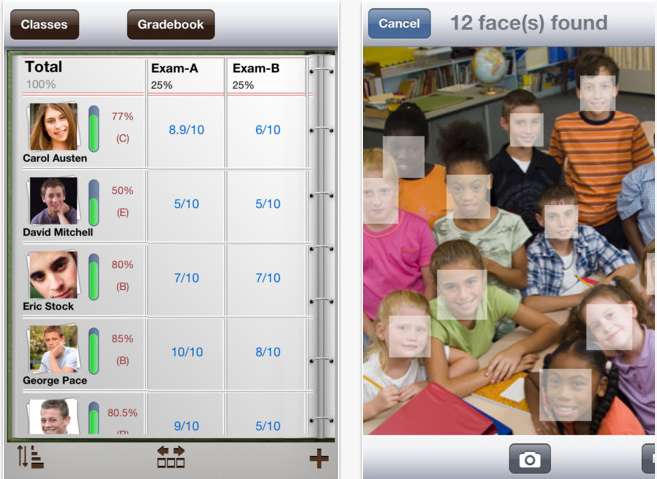
For make students you can take a picture of the whole class and the app recognizes faces and asks you to identify them to help you build a roster with names and pictures for attendance purposes.
Question:
Have you tried Teacher Kit? With our 'portal' system for storing attendance and grades, do we need something like this as well?
Teacher's Assistant Pro
Teacher's assistant is designed for iPhones and is designed as a way to give classroom feedback to parents and guardians. The lite free version doesn't appear to have an option for adding students (!) but the pro version isn't too expensive.

Using a .csv file, you enter or import a student's name, class period and email addresses, then add comments about student behaviour at any time. Teacher's Assistant Pro collects the data you enter to be used as you wish later. The app stores the name of the infraction/accolade, the date and time, where it occurred, which class period, a detailed description, what teacher action occurred. There's an "Optional" space to track any other information about the student's actions.
Useful videos
An overview of the app
How to import student data into the app
Question:
Have you tried this app out? What do you think of it?

Using a .csv file, you enter or import a student's name, class period and email addresses, then add comments about student behaviour at any time. Teacher's Assistant Pro collects the data you enter to be used as you wish later. The app stores the name of the infraction/accolade, the date and time, where it occurred, which class period, a detailed description, what teacher action occurred. There's an "Optional" space to track any other information about the student's actions.
Useful videos
An overview of the app
How to import student data into the app
Question:
Have you tried this app out? What do you think of it?
Sunday, December 16, 2012
LAN School
Lanschool is classroom management software that allows teachers to control student screens. It gets pretty good reviews. However, it is pricey so would have to be a system-wide purchasing decision.
You can download a free trial of Lanschool to your desktop and a teacher and students app is then free to support that downloaded software.
The software described by the LAN school developers:
I haven't trialed it yet but will do next semester. Has anyone seen it in action?
You can download a free trial of Lanschool to your desktop and a teacher and students app is then free to support that downloaded software.
The software described by the LAN school developers:
I haven't trialed it yet but will do next semester. Has anyone seen it in action?
Class Dojo
Class Dojo is a free app with icons of amusing monsters for each student.


First you set up your class on your laptop by going to http://teach.classdojo.com/login and
registering. Add a class and edit the class to add names and the behaviour you want to
address (e.g. +1 for being on task, -1 for chatting in Arabic).
Then you run the class either as a website on the teacher’s
computer or using the iPad app and add/subtract points as the lesson goes
along.


At the end, you can run reports which will be very helpful when
it comes to writing reports about study skills.
Question:
Have you found any similar free apps?
Guided Access

Guided Access came along with the iOS6 upgrade and proved to be one good reason for an iPad contract that insists on students upgrading to the latest iOS updates.
Question:
If you've used it, how do you feel about it?
iPad behaviour agreements
Some examples of iPad agreements from the web. They all include some focus on technical aspects and some on behavioral expectations.
Many of them are created for the teaching institution as a whole:
Many of them are created for the teaching institution as a whole:
- Canadian International School Bangalore
- Moultonborough School District
- Providence Christian Academy
- Thomas Carr College
- Lake Minneola High
My favorite ones are class and teacher specific:
Questions:
1. Many of the contracts rely on enforcing rules by withdrawing iPad privileges. How could we ensure such a contract was followed by students on our context?
2. What would you like to see included in an iPad behaviour contract?
2. What would you like to see included in an iPad behaviour contract?
New distractions and new ways of learning
OK, so we know that the iPads offer a wealth of learning opportunities. We know that our paradigm of teaching and learning is changing due to mobile technologies We're modern professionals and fine with that.
Sometimes though, stakeholders in an individual's education want to know that the student is focused on a particular task or aspect of a task; that they're using a certain app and have their head in a space which is helping them with the learning task at hand.
Here are some classroom management ideas, gathered from the internet and colleagues, for how we can help our students to make the best educational use of their iPads.
Sometimes though, stakeholders in an individual's education want to know that the student is focused on a particular task or aspect of a task; that they're using a certain app and have their head in a space which is helping them with the learning task at hand.
Here are some classroom management ideas, gathered from the internet and colleagues, for how we can help our students to make the best educational use of their iPads.
Subscribe to:
Posts (Atom)